
Overview#
CalQ is a notepad. You type a line, and the answer appears next to it. There is no equals button and no calculator keypad. A line can be a sum, a currency conversion, a unit conversion, a date, a time in another city, a running total, or just a sentence you want written in correct English.
It runs in the browser and as a small Mac app. I built it with Claude and Codex. I made the product and design decisions.
What the picture above shows
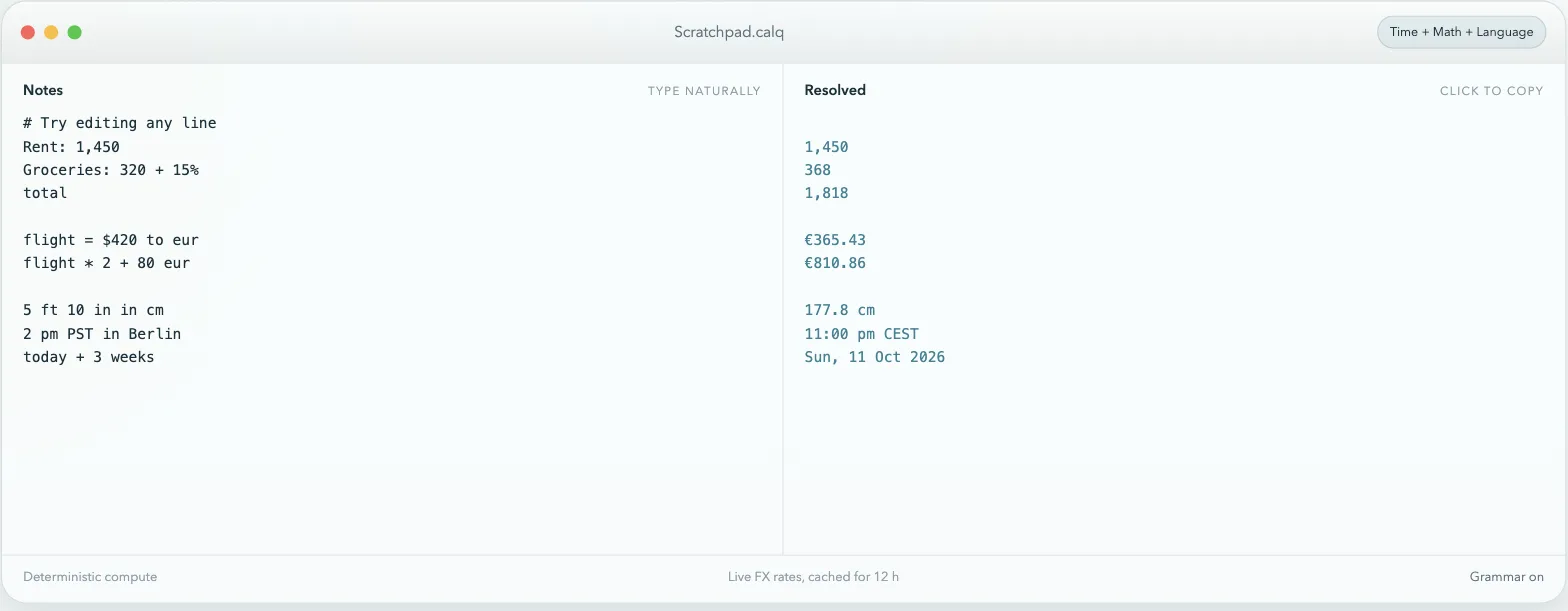
Every line on the left has its answer on the right, lined up with it. Rent: 1,450 is a label and a number, so it keeps the number. Groceries: 320 + 15% adds the percentage. total adds up the numbers above it. flight = $420 to eur stores a variable and converts it in one line, so flight * 2 + 80 eur knows what flight is worth. Then a height in feet becomes centimetres, an afternoon in California becomes an evening in Berlin, and a date three weeks out becomes a real date.
The problem#
I do small calculations all day. What a price is in euros, what a meeting time is for someone in Delhi, what a number is after adding tax, what 5 foot 10 is in centimetres.
I used to do these in three places, and all three annoyed me.
- The calculator app. One line at a time. The moment I need the previous answer again, it is gone.
- A search box. It works, but it means typing my rent into a search engine.
- A spreadsheet. Right for tables, far too much for “what is 320 plus 15 percent”.
What I actually wanted was the back of an envelope. Somewhere to write a few lines, where the lines can refer to each other, and where the arithmetic does itself. That idea is not mine — Numi and Soulver have done it for years. I wanted one that also handled the two things I reach for most, which are live currency rates and time zones, and I wanted it in a browser tab as well as on my Mac.
Three kinds of line#
This is the part that takes a minute to explain, and it is the whole idea. You do not tell CalQ what kind of line you are writing. It reads each line and decides for itself, and there are only three answers.
- Compute. Anything with numbers in it — arithmetic, percentages, units, currency, variables, dates, times, running totals. The answer appears on the right.
- Language. A sentence written as a sentence. CalQ writes it back in correct English. This is optional and I can turn it off in the title bar.
- Quiet. Everything else. Headings, comments starting with
#or//, blank lines, and anything it does not recognise. It says nothing rather than guessing.
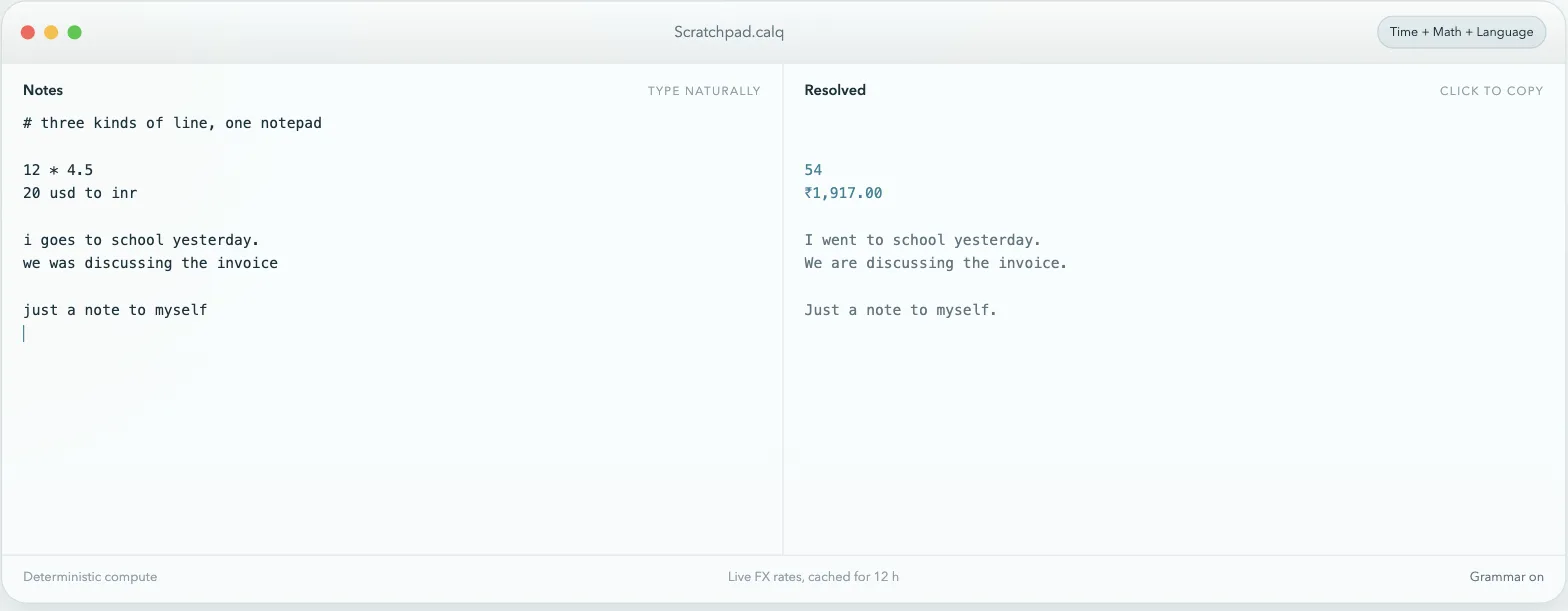
Getting this wrong in either direction is what makes a tool like this annoying. If it treats a note as maths you get errors down the side of your notes. If it treats maths as a note you get nothing. So the rule is deliberately cautious: a line has to look clearly like a calculation before CalQ computes it, and when it is unsure it stays quiet.
What it can work out#
| Kind | Example | Answer |
|---|---|---|
| Arithmetic and percentages | 320 + 15% | 368 |
| Running totals | total | adds the numbers above it |
| Variables | flight = $420 to eur | reusable on any later line |
| Currency | 20 usd to inr | live rates, cached for 12 hours |
| Units | 5 ft 10 in in cm | 177.8 cm |
| Rates | 100 km / 2 h | 50 km/h |
| Temperature | 30 c to f | 86 °F |
| Time zones | 2 pm PST in Berlin | 11:00 pm CEST |
| Dates | today + 3 weeks | a real date |
The units cover length, weight, volume, area, speed, temperature, time, data and CSS sizes. Cities are looked up rather than hard-coded, so an unusual place still resolves to the right time zone. Currency rates are fetched and cached for twelve hours, and there is an offline table underneath so a conversion still gives an approximate answer with no connection.
The Mac app#
The browser version is the same code, but a notepad I use twenty times a day should not be a tab I have to find. So there is a Mac app: a small Swift window around the same web UI, about half a megabyte. Not Electron, which would have been a hundred times the size for the same thing.
- ⌃⌥C from anywhere brings it up.
Eschides it. Closing the window keeps it running. - It remembers the sheet, the theme and where the window was.
- Sentences stay on the Mac. The English rewriting uses Apple's on-device model. If Apple Intelligence is off it falls back to languagetool.org, which is the only time a line leaves the machine.
- Keep on Top and Open at Login are in the menu, and the shortcut can be changed.
What I learned#
The hard part was never the maths. Parsing 320 + 15% is easy. The hard part was deciding, for a line someone typed without thinking about it, whether they wanted an answer at all.
My first version tried to compute everything and the sheet filled up with errors next to ordinary notes. The fix was to stop treating “I don't know” as a failure. A line that says nothing is fine. A line that says Unable to parse token next to a shopping list is not.
The screenshots on this page are a scratch sheet I typed for them. CalQ keeps everything in the browser or on my Mac, so there is nothing to anonymise.